> ## Documentation Index
> Fetch the complete documentation index at: https://docs.nemu.com.br/llms.txt
> Use this file to discover all available pages before exploring further.
# Nemu MCP
> Connect your Nemu data to Claude and ask about campaigns, products, customers and creatives in natural language
## What is Nemu MCP?
**Nemu MCP** is a connector that links your Nemu dashboard data directly to **Claude**. Once connected, you ask questions in natural language — "which campaign had the best ROAS last week?" — and Claude queries your actual operation data to answer.
The connector uses **MCP (Model Context Protocol)**, an open standard for giving AI assistants secure access to external data sources.
Access is **read-only**. Claude can query and analyze your data, but cannot
change anything inside Nemu.
## Requirements
* A [claude.ai](https://claude.ai) account with access to **custom connectors**.
* Access to the Nemu dashboard you want to connect (as the owner or with permission on it).
## How to connect
On [claude.ai](https://claude.ai), in a new chat, click the **+** button, go to **Connectors** and then **Manage connectors**.
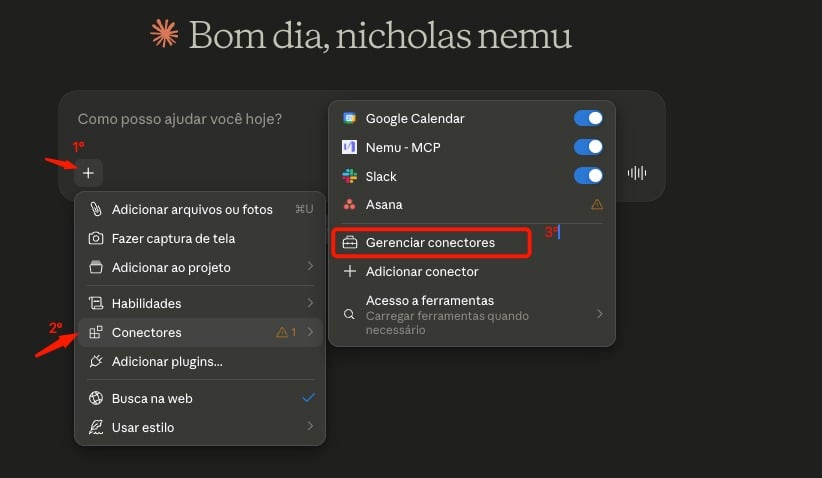 Click the **+** button and choose **Add custom connector**.
 * **Name**: a name to identify the connection, for example `Nemu - MCP`.
* **URL**: `https://mcp.nemu.com.br`
Then expand **Advanced settings** and fill in:
* **OAuth Client ID**: your **Nemu dashboard ID** (see below how to find it).
* **OAuth Client Secret**: leave it **blank** — it is not required.
* **Name**: a name to identify the connection, for example `Nemu - MCP`.
* **URL**: `https://mcp.nemu.com.br`
Then expand **Advanced settings** and fill in:
* **OAuth Client ID**: your **Nemu dashboard ID** (see below how to find it).
* **OAuth Client Secret**: leave it **blank** — it is not required.
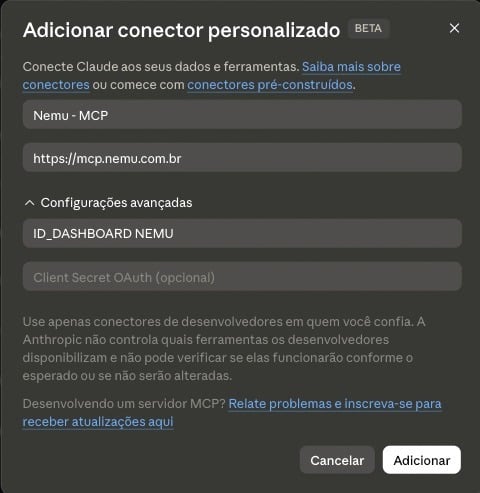 Click **Add**.
Claude will redirect you to Nemu. Log in, review the dashboard being authorized and accept the connection.
That's it — the connector shows up in the list and is ready to use.
## Where to find the dashboard ID
The dashboard ID is in your Nemu account URL, right after `/dashboards/`:
```
https://dashboards.nemu.com.br/dashboards/1234/
```
In this example, the dashboard ID is **`1234`**.
Fill in the **OAuth Client ID** with the dashboard number only, without slashes
or spaces. If you enter the ID of a dashboard you don't have access to, the
connection will be refused at the authorization step.
## What you can ask
Once connected, Claude has access to the authorized dashboard's data. Some examples of what you can ask for:
| Area | Example questions |
| ----------------- | -------------------------------------------------------------------------------------------------------------- |
| **Campaigns** | "Compare Meta and Google ROAS over the last 30 days."
Click **Add**.
Claude will redirect you to Nemu. Log in, review the dashboard being authorized and accept the connection.
That's it — the connector shows up in the list and is ready to use.
## Where to find the dashboard ID
The dashboard ID is in your Nemu account URL, right after `/dashboards/`:
```
https://dashboards.nemu.com.br/dashboards/1234/
```
In this example, the dashboard ID is **`1234`**.
Fill in the **OAuth Client ID** with the dashboard number only, without slashes
or spaces. If you enter the ID of a dashboard you don't have access to, the
connection will be refused at the authorization step.
## What you can ask
Once connected, Claude has access to the authorized dashboard's data. Some examples of what you can ask for:
| Area | Example questions |
| ----------------- | -------------------------------------------------------------------------------------------------------------- |
| **Campaigns** | "Compare Meta and Google ROAS over the last 30 days."
"Which campaigns sold the most of brand X?" |
| **Creatives** | "Which were my best performing Meta creatives this month?"
"What are competitor Y's ads communicating?" |
| **Products** | "Which products are growing the most in revenue?"
"Which products are usually bought together?" |
| **Customers** | "What is the LTV and repurchase rate of new customers?" |
| **Web analytics** | "Which pages have the highest bounce rate?"
"How is a product's funnel doing, from view to purchase?" |
| **UTMs** | "Which sources and mediums brought in the most revenue?" |
| **Influencers** | "How much revenue did influencers generate per coupon?" |
| **Costs** | "What are my operational costs and how do they affect margin?" |
| **Experiments** | "Which variation won the banner A/B test?" |
You can combine all of this into a single question. For example: "put together
a summary of last week with revenue, ROAS per channel, the top 5 selling
products and the best performing creatives".
## Things to keep in mind
* **One dashboard per connector.** The connector only answers about the authorized dashboard. To query another dashboard, create a new connector with the matching ID.
* **Query periods.** Most queries cover up to **90 days** at a time. Operational cost history reaches up to **365 days**.
* **Creative analysis can take longer.** Questions involving creatives process images and transcribe video audio, so the answer takes more time than the others.