> ## Documentation Index
> Fetch the complete documentation index at: https://docs.nemu.com.br/llms.txt
> Use this file to discover all available pages before exploring further.
# TikTok Ads
> Learn how to properly configure Nemu URL parameters (UTMs) in TikTok Ads to track your campaigns.
Learn how to add Nemu parameters alongside traditional UTMs to track your sales accurately on TikTok.
Learn how to add UTM parameters in TikTok Ads Manager to track your sales accurately.
If you don't understand the difference between traditional UTMs and Nemu UTMs,
[click here](/en/platform/utms/how-they-work) to learn more.
***
## With UTMs configured
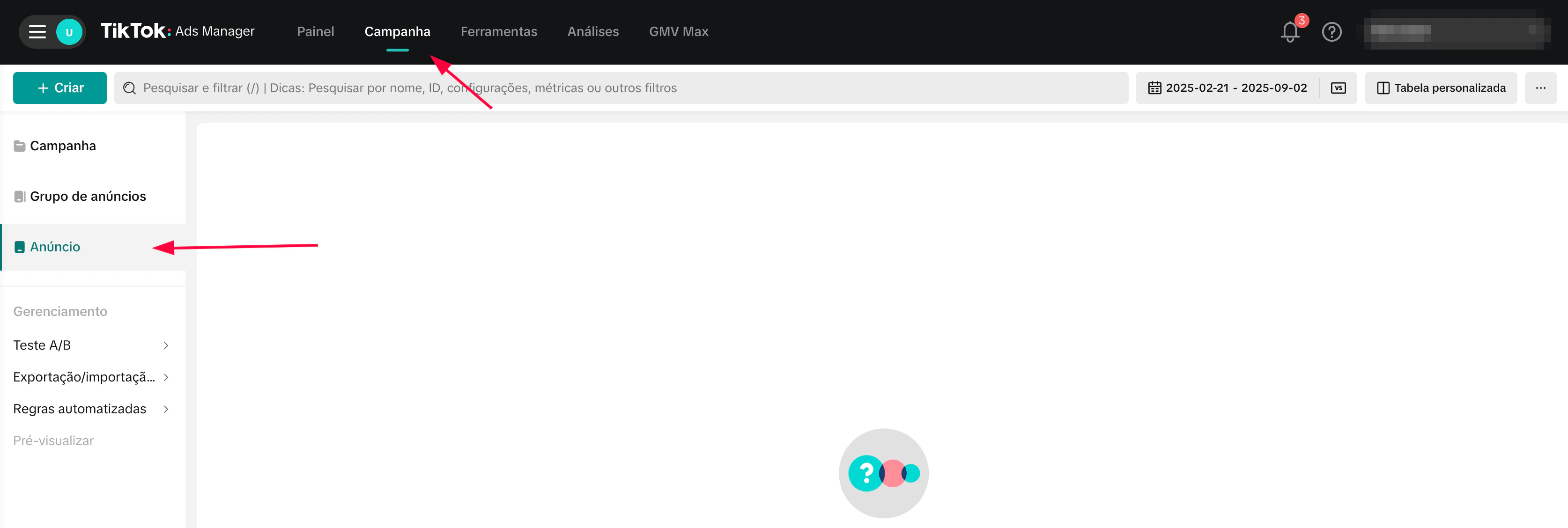
1. Access your TikTok Ads Manager, click on **Campaigns** and then on **Ads**
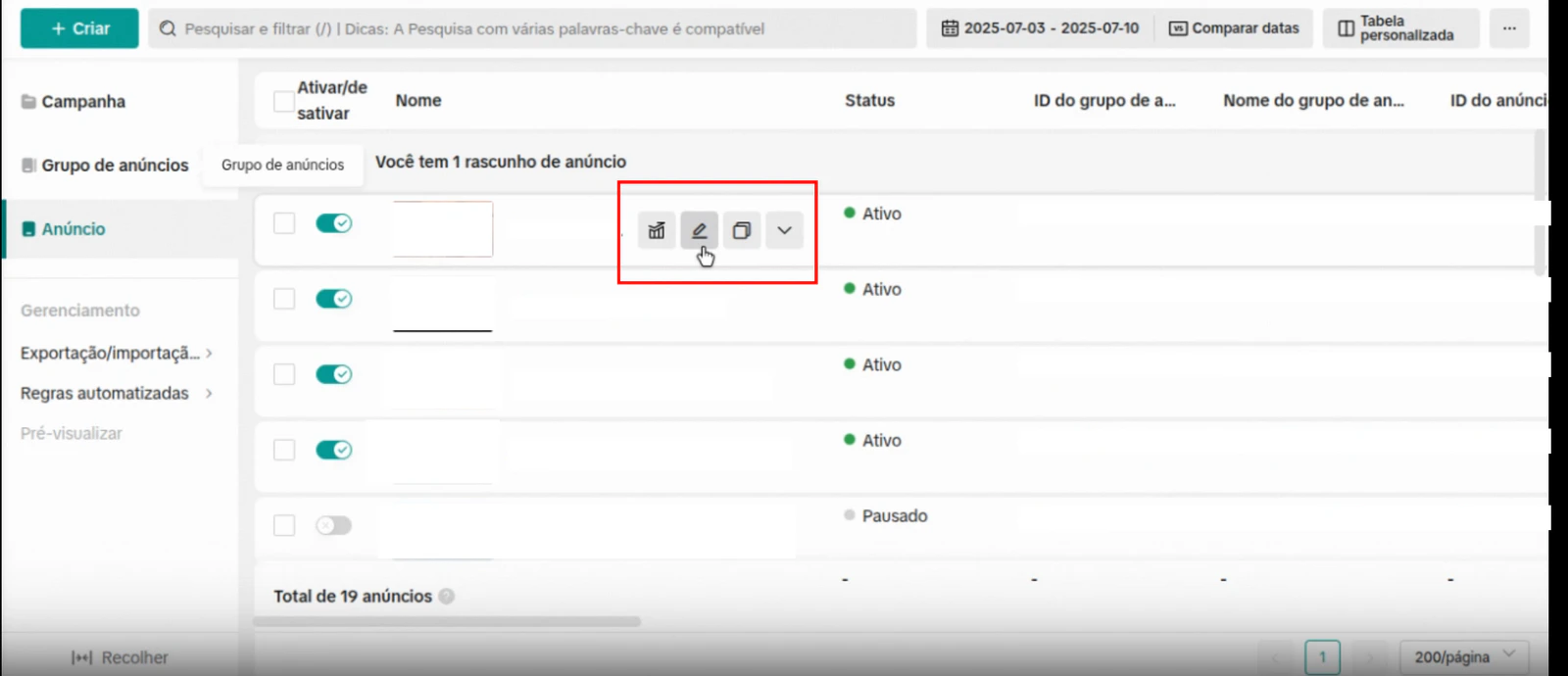
 2. Click on the **edit button** to edit the ad
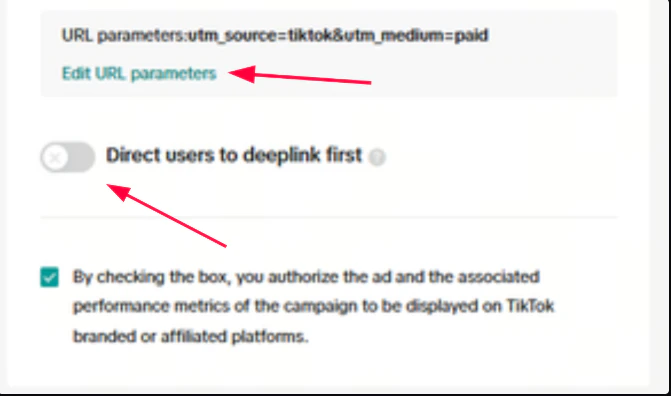
 3. Disable the option **Automatically add URL parameters** and click on **Edit URL Parameters**
 4. In **custom parameters** enable the option Detect Automatically and then click on **Add** button
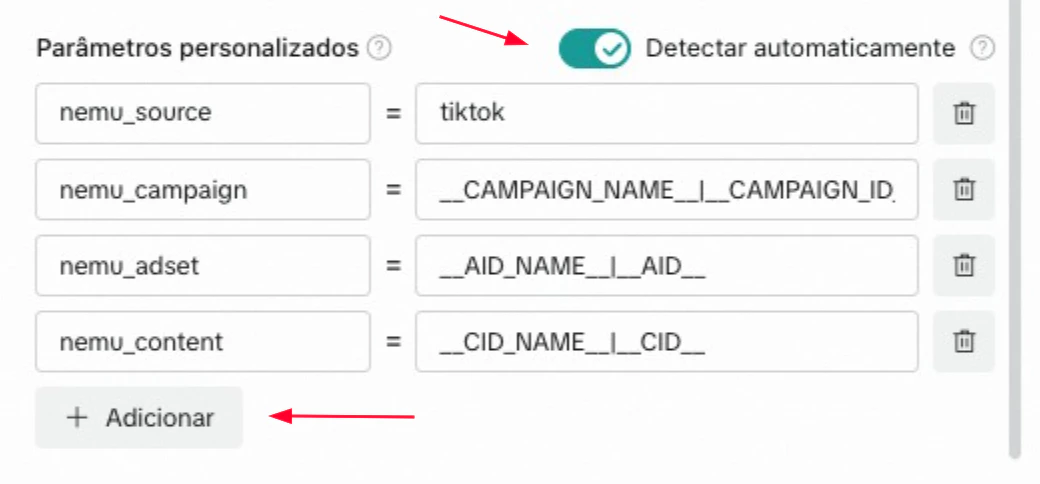 5. Copy and paste the parameters for each field as shown in the image above and click on **Apply**
**nemu\_source**
```text theme={null}
tiktok
```
**nemu\_campaign**
```text theme={null}
__CAMPAIGN_NAME__|__CAMPAIGN_ID__
```
**nemu\_adset**
```text theme={null}
__AID_NAME__|__AID__
```
**nemu\_content**
```text theme={null}
__CID_NAME__|__CID__
```
> **Example of how your final destination URL should look with Standard Checkout:**
```text wrap theme={null}
https://www.example.com/landing-page?utm_source=tiktok&utm_medium=cpc&utm_campaign=promo_july&nemu_source=tiktok&nemu_campaign=__CAMPAIGN_NAME__|__CAMPAIGN_ID__&nemu_adset=__AID_NAME__|__AID__&nemu_content=__CID_NAME__|__CID__
```
***
## Without UTMs configured
1. Access your TikTok Ads Manager, click on **Campaigns** and then on **Ads**
2. Click on the **edit button** to edit the ad
3. Disable the option **Automatically add URL parameters** and click on **Edit URL Parameters**
4. Copy and paste the URL parameters configuration according to your checkout.
If your checkout is different from Hotmart or Hotmart Affiliates, use the Standard configuration.
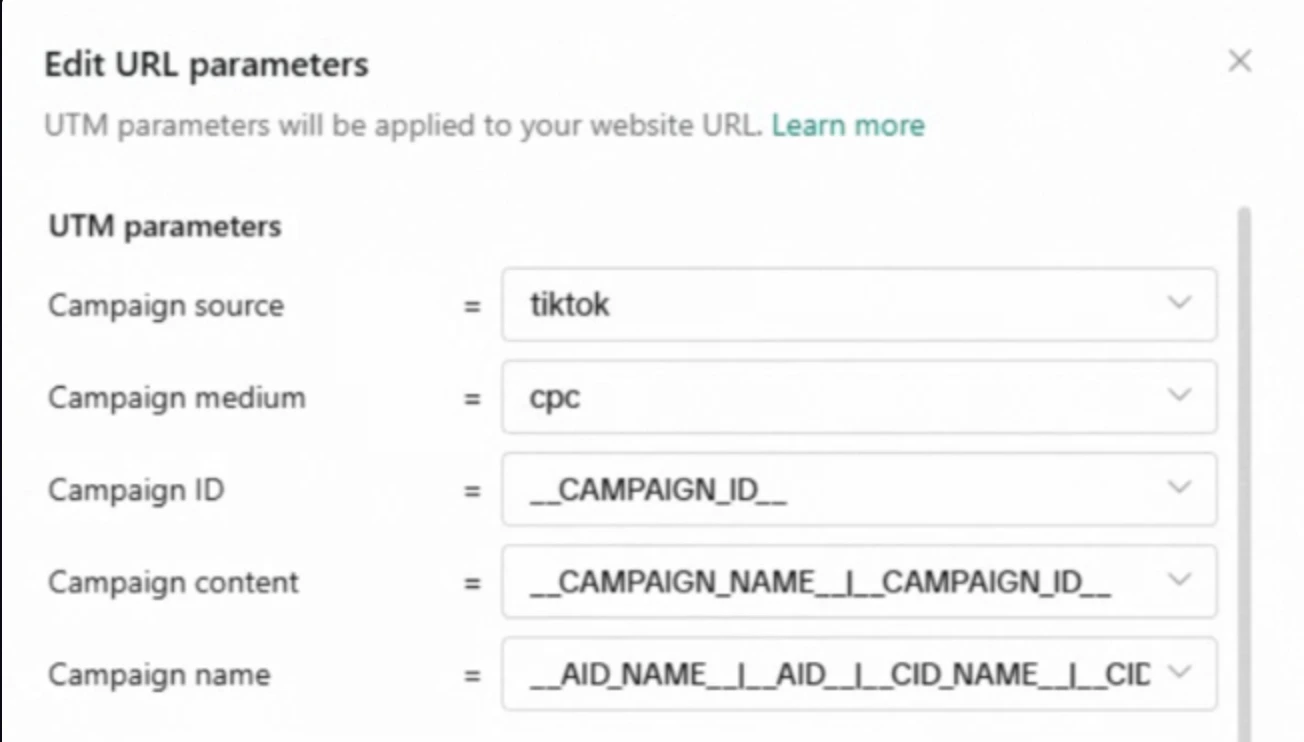
**Campaign source**
```text theme={null}
tiktok
```
**Campaign medium**
```text theme={null}
cpc
```
**Campaign ID**
```text theme={null}
__CAMPAIGN_ID__
```
**Campaign content**
```text theme={null}
__AID_NAME__|__AID__|__CID_NAME__|__CID__
```
**Campaign name**
```text theme={null}
__CAMPAIGN_NAME__|__CAMPAIGN_ID__
```
7. In **custom parameters** enable the option Detect Automatically and then click on **Add** button
8. Copy and paste the parameters for each field as shown in the image above and click on **Apply**
**nemu\_source**
```text theme={null}
tiktok
```
**nemu\_campaign**
```text theme={null}
__CAMPAIGN_NAME__|__CAMPAIGN_ID__
```
**nemu\_adset**
```text theme={null}
__AID_NAME__|__AID__
```
**nemu\_content**
```text theme={null}
__CID_NAME__|__CID__
```
If you use Hotmart, also add new fields with the following custom parameters:
**src**
```text wrap theme={null}
tiktok|__CAMPAIGN_NAME__|__CAMPAIGN_ID__|__CID_NAME__|__CID__|__AID_NAME__|__AID__
```
**sck**
```text wrap theme={null}
tiktok|__CAMPAIGN_NAME__|__CAMPAIGN_ID__|__CID_NAME__|__CID__|__AID_NAME__|__AID__
```
> **Final URL example:**
```text wrap theme={null}
https://www.example.com/landing-page?utm_source=tiktok&utm_medium=cpc&utm_campaign=promo_july&nemu_source=tiktok&nemu_campaign=__CAMPAIGN_NAME__|__CAMPAIGN_ID__&nemu_adset=__AID_NAME__|__AID__&nemu_content=__CID_NAME__|__CID__
```