> ## Documentation Index
> Fetch the complete documentation index at: https://docs.nemu.com.br/llms.txt
> Use this file to discover all available pages before exploring further.

# TikTok Ads

> Learn how to integrate your TikTok Ads account with Nemu to import campaigns, performance data, and metrics.

## What will be imported

* Campaigns, ad sets, and ads
* Spend, clicks, and impressions data

## How to integrate

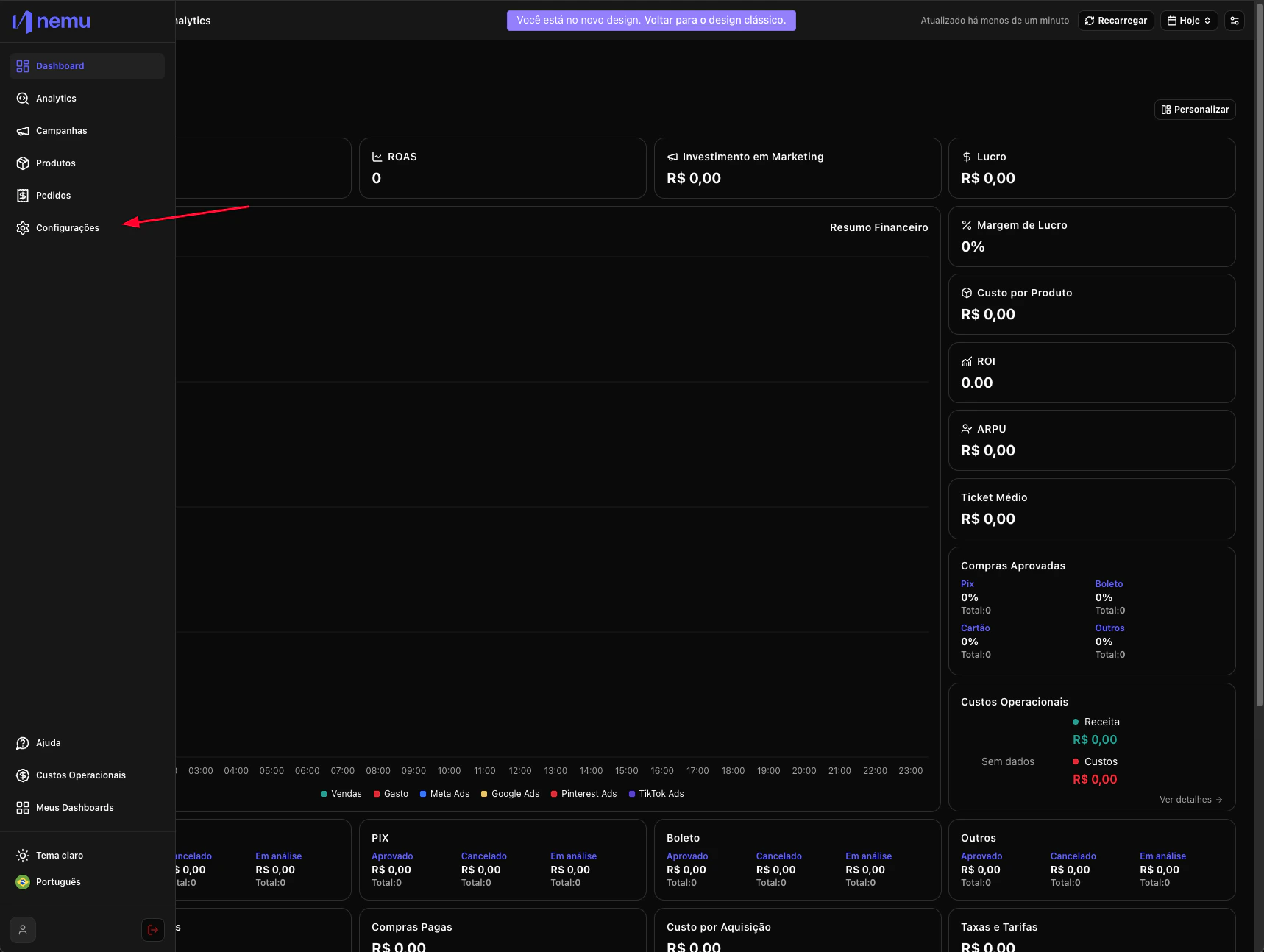
1. In the desired Dashboard, hover over the sidebar menu and go to **Settings**.
   <img src="https://mintcdn.com/nemu/NbXpGdLb8btwpDU9/assets/pages/onboarding/integracao-redes-sociais/1.png?fit=max&auto=format&n=NbXpGdLb8btwpDU9&q=85&s=a035086f46ac8e6925e64e7f2e87ee11" alt="" width="1718" height="1294" data-path="assets/pages/onboarding/integracao-redes-sociais/1.png" />

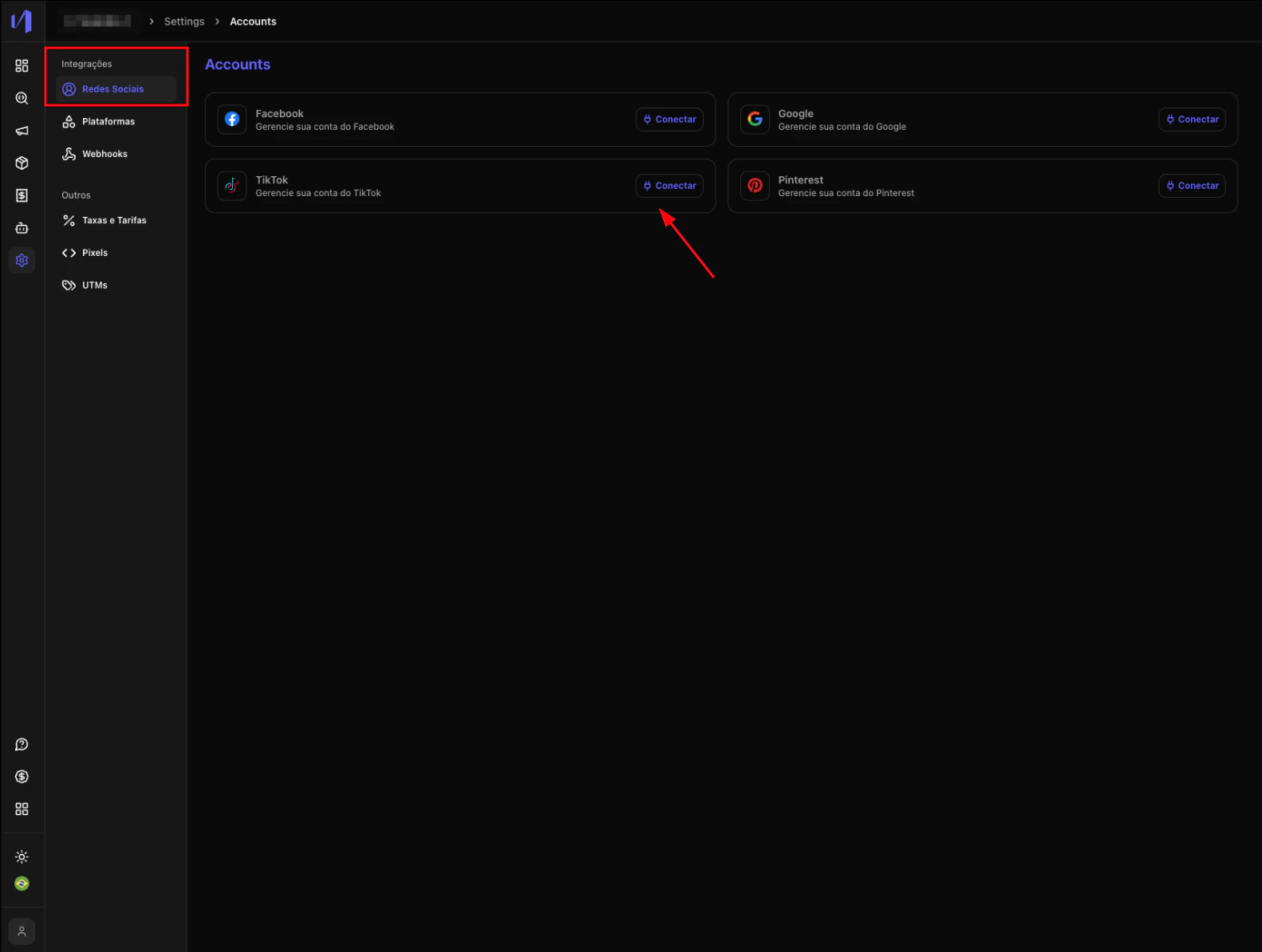
2. In **Integrations** > **Social Networks** click on the **Connect** button
   <img src="https://mintcdn.com/nemu/NbXpGdLb8btwpDU9/assets/pages/onboarding/integracao-redes-sociais/botao-tiktok.png?fit=max&auto=format&n=NbXpGdLb8btwpDU9&q=85&s=13b9211d4403df7c10cd72add871d8e0" alt="" width="1582" height="1194" data-path="assets/pages/onboarding/integracao-redes-sociais/botao-tiktok.png" />

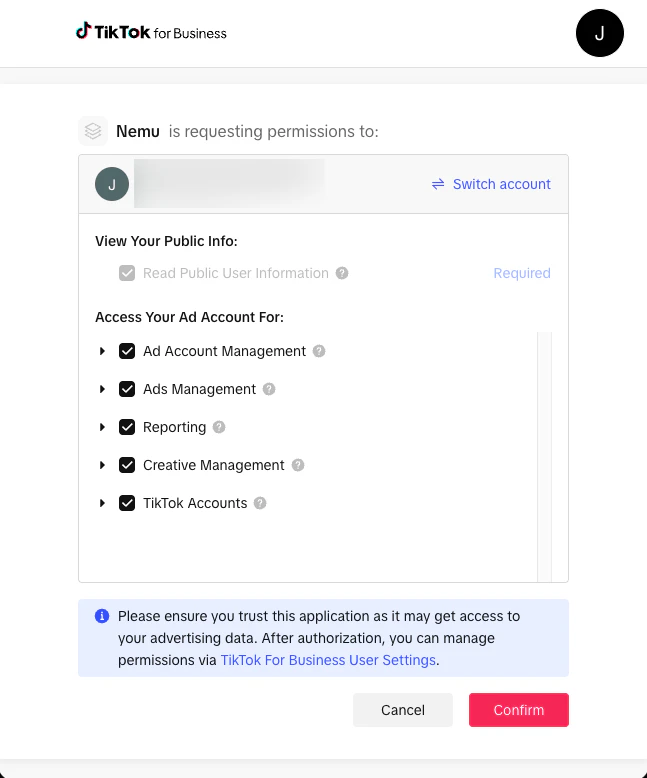
3. Log in to your TikTok Ads Manager and **authorize access** to your ad account.
   <img src="https://mintcdn.com/nemu/CRoFN_FaZMqtlUsY/assets/pages/onboarding/integracao-redes-sociais/autorizacao-tiktok.png?fit=max&auto=format&n=CRoFN_FaZMqtlUsY&q=85&s=13b059b3b49aca870c8e9cbac92d5e3f" alt="" width="647" height="778" data-path="assets/pages/onboarding/integracao-redes-sociais/autorizacao-tiktok.png" />

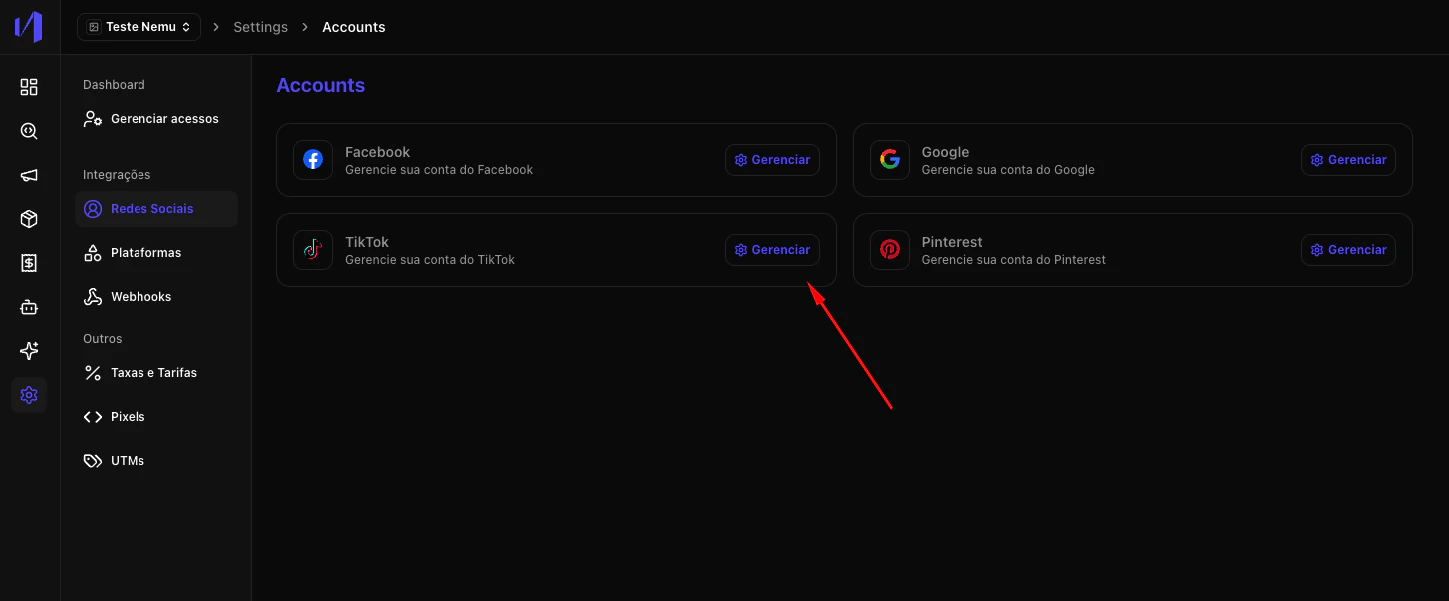
4. Click on the **Manage** button
   <img src="https://mintcdn.com/nemu/CRoFN_FaZMqtlUsY/assets/pages/onboarding/integracao-redes-sociais/botao-gerenciar-tiktok.png?fit=max&auto=format&n=CRoFN_FaZMqtlUsY&q=85&s=793e2b72bfd74821eaaf38b45e17accf" alt="" width="1449" height="601" data-path="assets/pages/onboarding/integracao-redes-sociais/botao-gerenciar-tiktok.png" />

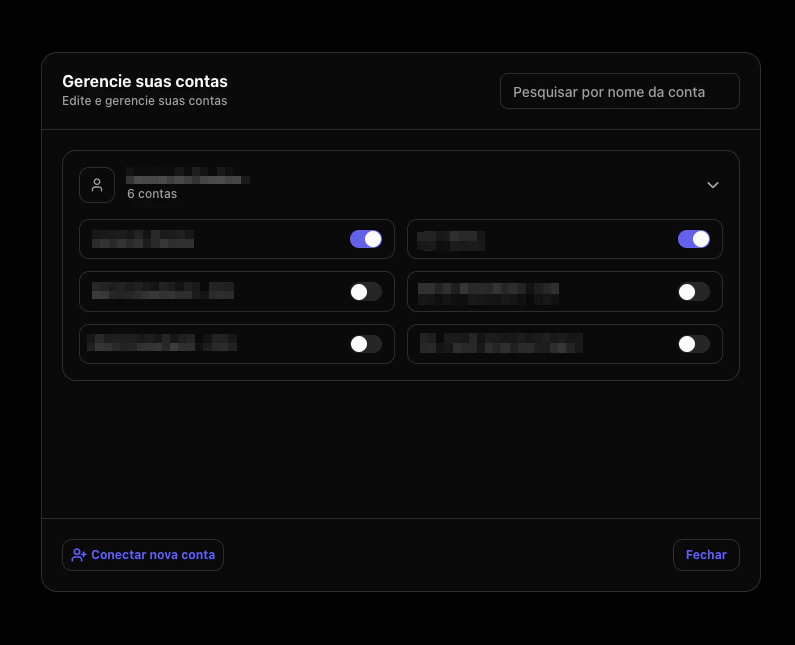
5. Select the TikTok account(s) you want to connect.

<Warning>
  If this step is not completed, campaigns will not appear in Nemu.
</Warning>

<img src="https://mintcdn.com/nemu/NbXpGdLb8btwpDU9/assets/pages/onboarding/integracao-redes-sociais/3.png?fit=max&auto=format&n=NbXpGdLb8btwpDU9&q=85&s=ee8134d699dfb03c12eb66bb8616b726" alt="" width="795" height="645" data-path="assets/pages/onboarding/integracao-redes-sociais/3.png" />

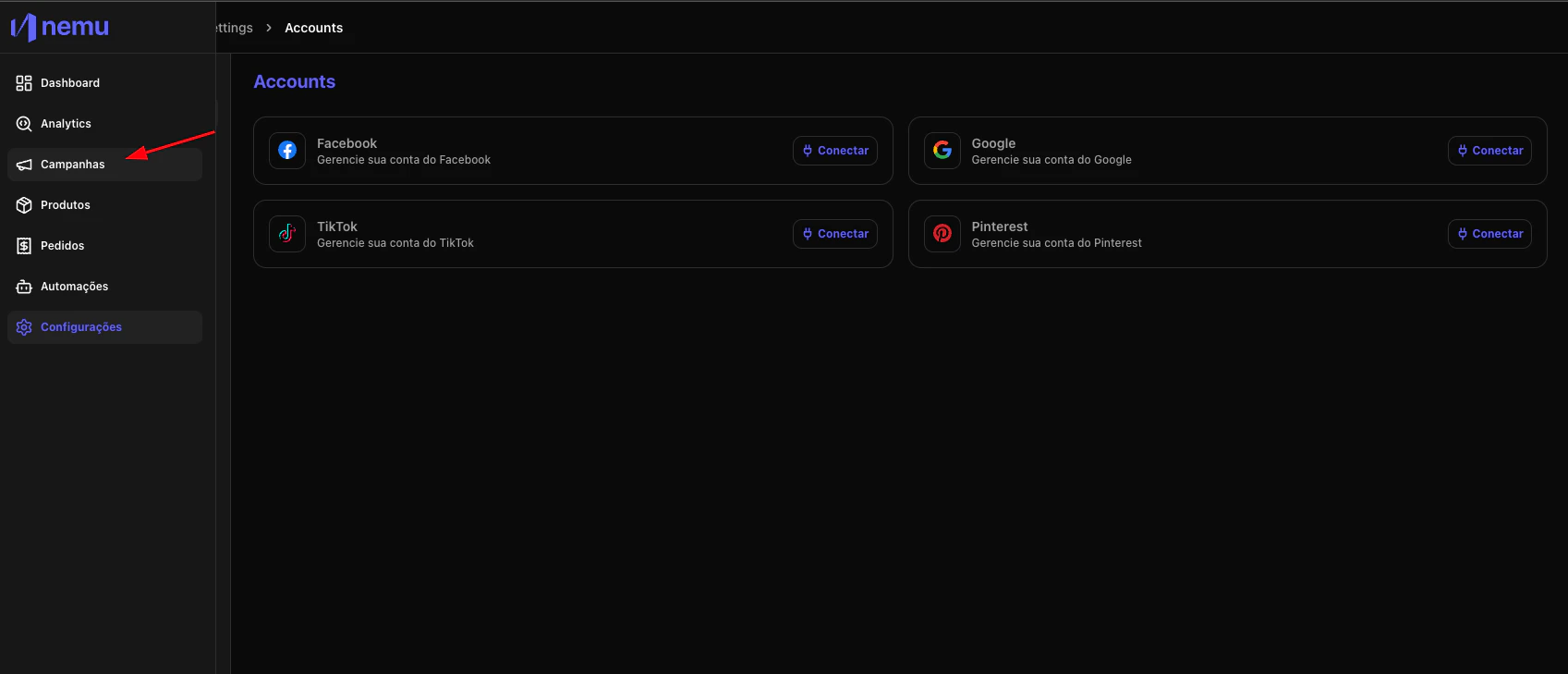
6. Access the campaigns page to view synchronized campaigns
   <img src="https://mintcdn.com/nemu/NbXpGdLb8btwpDU9/assets/pages/onboarding/integracao-redes-sociais/4.png?fit=max&auto=format&n=NbXpGdLb8btwpDU9&q=85&s=f39a5beabd47598aecb74d1f0724dff0" alt="" width="1697" height="729" data-path="assets/pages/onboarding/integracao-redes-sociais/4.png" />