> ## Documentation Index
> Fetch the complete documentation index at: https://docs.nemu.com.br/llms.txt
> Use this file to discover all available pages before exploring further.
# Meta Taxes
> Learn how to configure Meta (Facebook) taxes in Nemu and see how they impact your campaigns, ad sets, and individual ads.
The Meta taxes feature allows you to calculate and visualize the impact of taxes charged by Meta on your ad spending. This helps you have a more accurate view of the real costs of campaigns and optimize your budget considering these charges.
## Configuring Meta Taxes
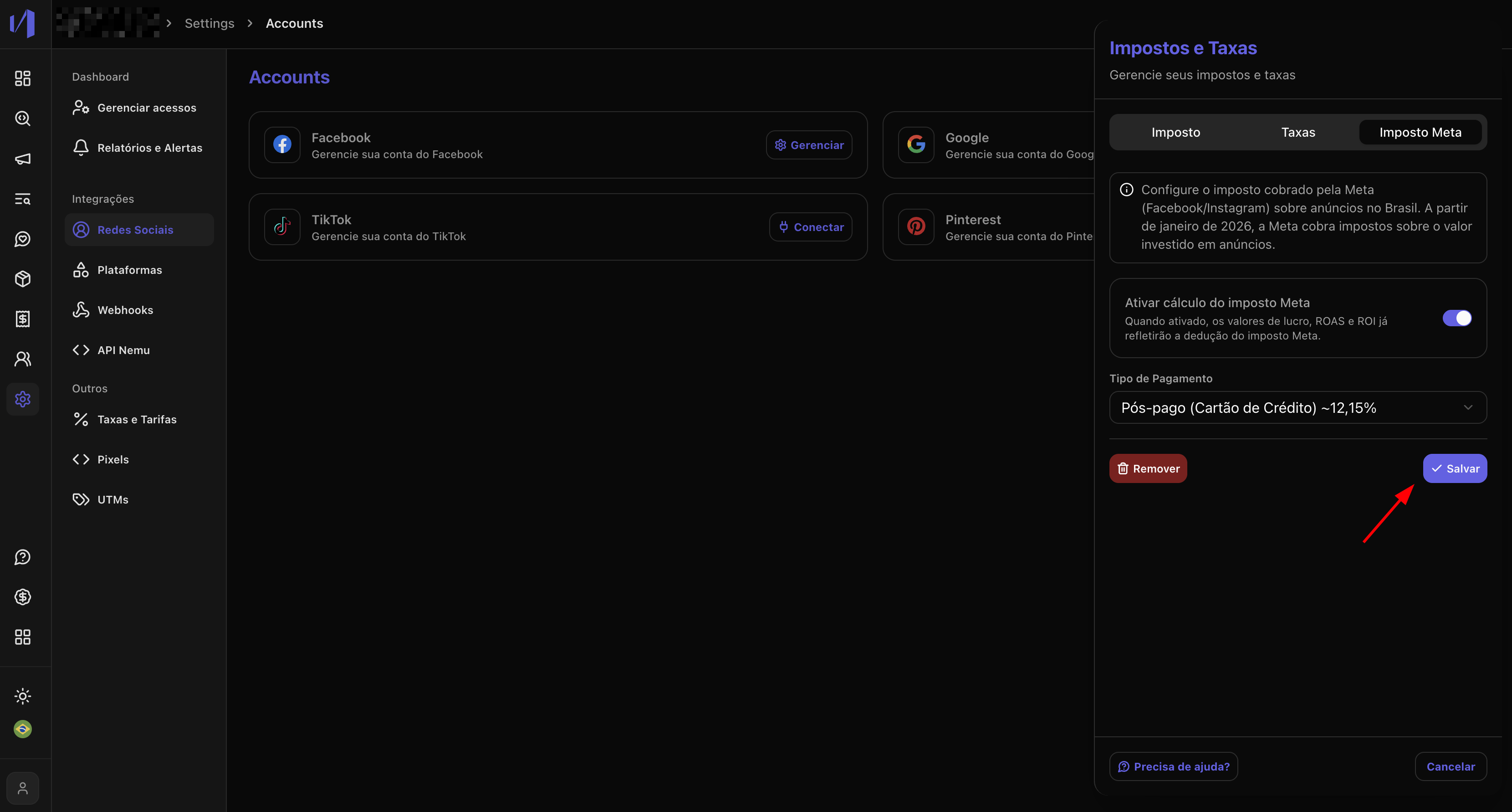
To configure Meta taxes, access the **Taxes and Fees** drawer in the platform settings.
**Steps to configure:**
1. Navigate to **Settings** > **Taxes and Fees**
2. Open the **Meta Taxes** tab
3. Choose the payment type:
* **Prepaid**: 13.83% (recommended for prepaid accounts)
* **Postpaid**: 12.15% (recommended for postpaid accounts)
* **Custom**: Define a specific percentage
4. Activate the configuration by clicking the toggle button
5. Save the changes
The predefined values (13.83% and 12.15%) are based on Meta's official rates
for different account types. Use "Custom" only if you have a specific rate
agreed with Meta.
 ## 2. Viewing Taxes in Campaigns
After configuring the taxes, you will see new columns related to Meta taxes in the Ad Manager tables, specifically in the **Meta Ads** tab.
### Available Columns
The following columns will be displayed in all tabs (Accounts, Campaigns, Ad Sets, and Ads):
* **Meta Tax**: Tax amount calculated on the spend
* **Profit w/ Meta Tax**: Profit considering the tax
* **ROAS w/ Meta Tax**: Return on ad spend considering the tax
* **ROI w/ Meta Tax**: Return on investment considering the tax
* **Margin w/ Meta Tax**: Profit margin considering the tax
## 2. Viewing Taxes in Campaigns
After configuring the taxes, you will see new columns related to Meta taxes in the Ad Manager tables, specifically in the **Meta Ads** tab.
### Available Columns
The following columns will be displayed in all tabs (Accounts, Campaigns, Ad Sets, and Ads):
* **Meta Tax**: Tax amount calculated on the spend
* **Profit w/ Meta Tax**: Profit considering the tax
* **ROAS w/ Meta Tax**: Return on ad spend considering the tax
* **ROI w/ Meta Tax**: Return on investment considering the tax
* **Margin w/ Meta Tax**: Profit margin considering the tax
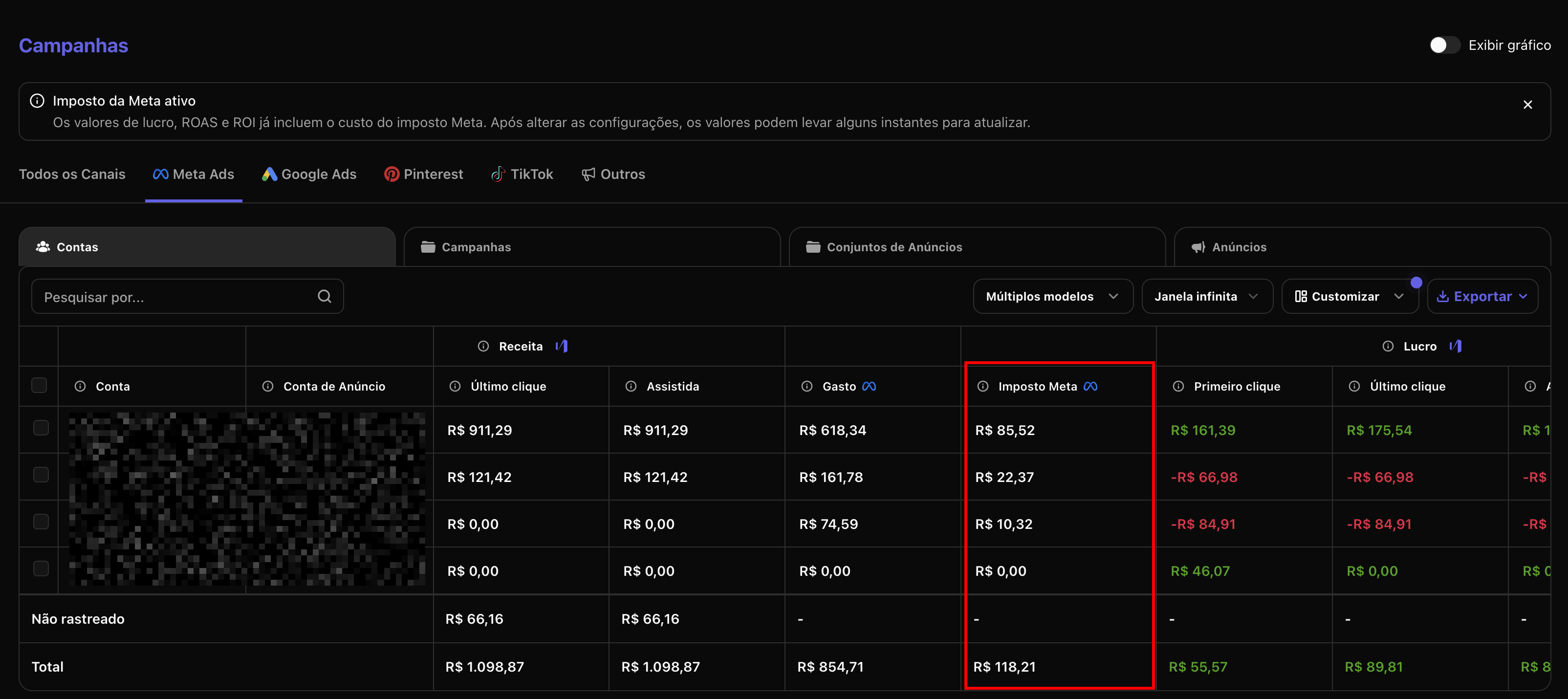 Tax columns only appear when the configuration is active and there are
recorded spends.
## 3. How Meta Taxes are Calculated
Meta taxes are calculated based on the total campaign spend and follow a specific formula that considers the configured rate.
### Calculation Formula
The tax amount is calculated using the following formula:
```
Meta Tax = (Spend × Rate) / (1 - Rate)
```
Where:
* **Spend**: Total amount spent on the campaign/ad set/ad
* **Rate**: Configured percentage (e.g., 12.15% = 0.1215)
### Practical Example
Suppose a campaign with spend of R\$ 6,573.03 and rate of 12.15% (postpaid):
```
Meta Tax = (6,573.03 × 0.1215) ÷ (1 - 0.1215)
= 798.62 ÷ 0.8785
= R$ 909.08
```
In this case, the calculated tax would be 909.08, resulting in an effective spend of R\$ 7,482.11 (declared spend + tax).
**Example breakdown:**
* Declared spend: R\$ 6,573.03
* Meta Tax (12.15%): R\$ 909.08
* Total effective spend: R\$ 7,482.11
### Difference between Prepaid and Postpaid
* **Prepaid (13.83%)**: Higher rate because the tax is already included in the amount you pay in advance
* **Postpaid (12.15%)**: Standard rate for accounts that pay after ad execution
### Impact on Metrics
All metrics related to profit and return (ROAS, ROI, margin) are recalculated considering the tax:
* **Profit w/ Meta Tax** = Revenue - (Spend + Meta Tax) - Other Costs
* **ROAS w/ Meta Tax** = Revenue ÷ (Spend + Meta Tax)
* **ROI w/ Meta Tax** = \[(Revenue - Spend - Meta Tax) ÷ (Spend + Meta Tax)] × 100
**Example with real numbers:**
Considering a campaign with:
* Spend: R\$ 6,573.03
* Meta Tax: R\$ 909.08
* Revenue: R\$ 151,875.00
| Metric | Without Tax | With Tax |
| ----------- | -------------- | -------------- |
| Total Spend | R\$ 6,573.03 | R\$ 7,482.11 |
| ROAS | 23.10x | 20.28x |
| Profit | R\$ 145,301.97 | R\$ 144,392.89 |
| ROI | 2,210% | 1,928% |
Note that when considering the Meta tax, the ROAS decreases from 23.10x to 20.28x, and the profit reduces by R\$ 909.08, reflecting the real cost of operations.
Use these adjusted metrics to make more informed decisions about campaign
optimization and budget allocation.
## Tax Legislation
Meta taxes are applied in accordance with Brazilian legislation on digital services taxation. Meta (Facebook) is required to collect taxes on amounts paid by Brazilian advertisers, following the rules of the tax reform that came into effect.
**Main points of the legislation:**
* 12.15% taxation for postpaid accounts
* 13.83% taxation for prepaid accounts
* Application on the total value of ads served
* Direct collection by Meta to the Brazilian government
## References
* [Reforma Tributária - Meta for Government & Nonprofits](https://www.facebook.com/government-nonprofits/blog/reforma-tributaria)
Tax columns only appear when the configuration is active and there are
recorded spends.
## 3. How Meta Taxes are Calculated
Meta taxes are calculated based on the total campaign spend and follow a specific formula that considers the configured rate.
### Calculation Formula
The tax amount is calculated using the following formula:
```
Meta Tax = (Spend × Rate) / (1 - Rate)
```
Where:
* **Spend**: Total amount spent on the campaign/ad set/ad
* **Rate**: Configured percentage (e.g., 12.15% = 0.1215)
### Practical Example
Suppose a campaign with spend of R\$ 6,573.03 and rate of 12.15% (postpaid):
```
Meta Tax = (6,573.03 × 0.1215) ÷ (1 - 0.1215)
= 798.62 ÷ 0.8785
= R$ 909.08
```
In this case, the calculated tax would be 909.08, resulting in an effective spend of R\$ 7,482.11 (declared spend + tax).
**Example breakdown:**
* Declared spend: R\$ 6,573.03
* Meta Tax (12.15%): R\$ 909.08
* Total effective spend: R\$ 7,482.11
### Difference between Prepaid and Postpaid
* **Prepaid (13.83%)**: Higher rate because the tax is already included in the amount you pay in advance
* **Postpaid (12.15%)**: Standard rate for accounts that pay after ad execution
### Impact on Metrics
All metrics related to profit and return (ROAS, ROI, margin) are recalculated considering the tax:
* **Profit w/ Meta Tax** = Revenue - (Spend + Meta Tax) - Other Costs
* **ROAS w/ Meta Tax** = Revenue ÷ (Spend + Meta Tax)
* **ROI w/ Meta Tax** = \[(Revenue - Spend - Meta Tax) ÷ (Spend + Meta Tax)] × 100
**Example with real numbers:**
Considering a campaign with:
* Spend: R\$ 6,573.03
* Meta Tax: R\$ 909.08
* Revenue: R\$ 151,875.00
| Metric | Without Tax | With Tax |
| ----------- | -------------- | -------------- |
| Total Spend | R\$ 6,573.03 | R\$ 7,482.11 |
| ROAS | 23.10x | 20.28x |
| Profit | R\$ 145,301.97 | R\$ 144,392.89 |
| ROI | 2,210% | 1,928% |
Note that when considering the Meta tax, the ROAS decreases from 23.10x to 20.28x, and the profit reduces by R\$ 909.08, reflecting the real cost of operations.
Use these adjusted metrics to make more informed decisions about campaign
optimization and budget allocation.
## Tax Legislation
Meta taxes are applied in accordance with Brazilian legislation on digital services taxation. Meta (Facebook) is required to collect taxes on amounts paid by Brazilian advertisers, following the rules of the tax reform that came into effect.
**Main points of the legislation:**
* 12.15% taxation for postpaid accounts
* 13.83% taxation for prepaid accounts
* Application on the total value of ads served
* Direct collection by Meta to the Brazilian government
## References
* [Reforma Tributária - Meta for Government & Nonprofits](https://www.facebook.com/government-nonprofits/blog/reforma-tributaria)