> ## Documentation Index
> Fetch the complete documentation index at: https://docs.nemu.com.br/llms.txt
> Use this file to discover all available pages before exploring further.
# PMAX Campaigns and Asset Groups
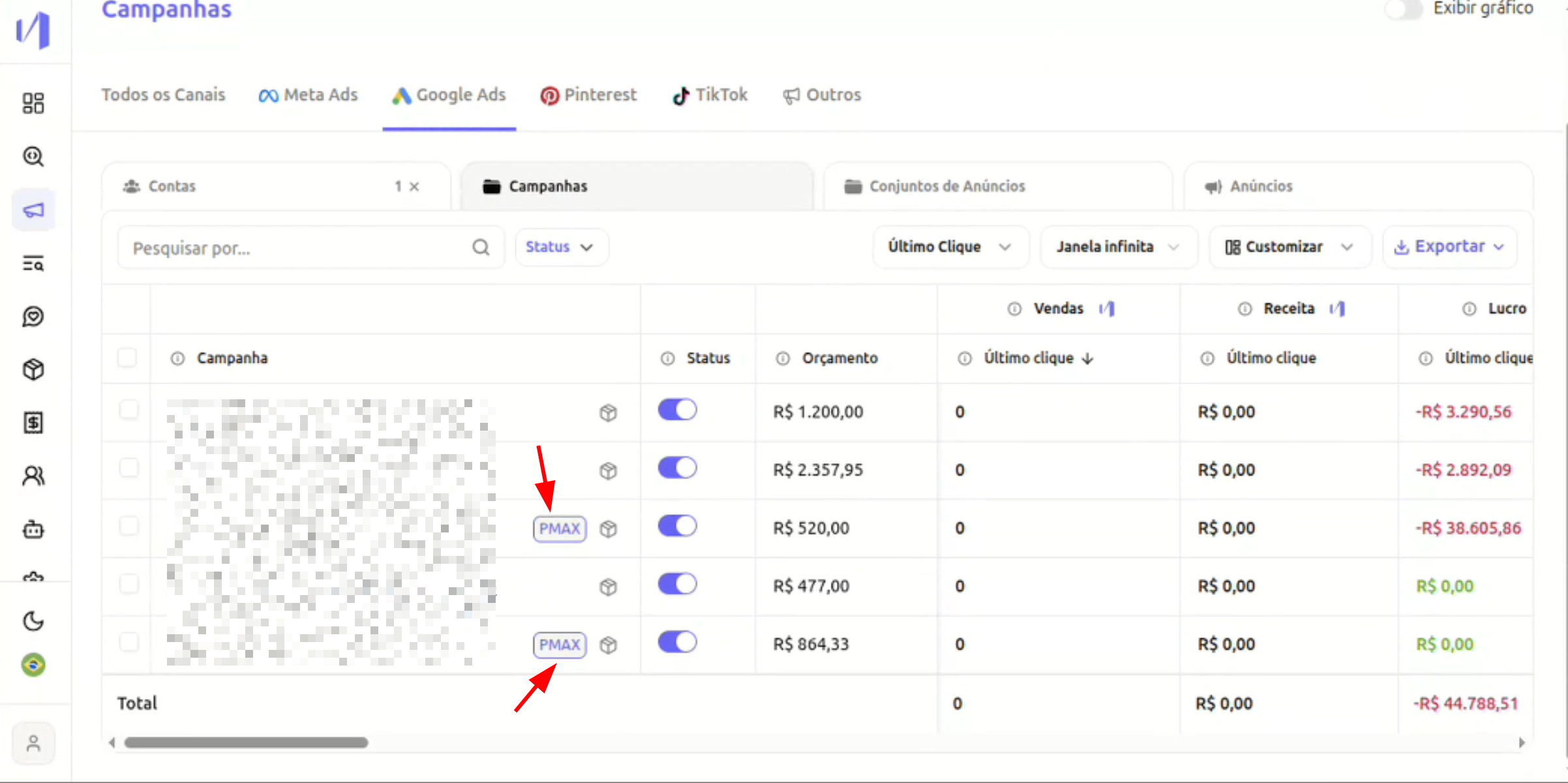
> Nemu now allows you to identify and analyze Performance Max (PMAX) campaigns directly in the Campaigns tab, within the Google Ads section, in addition to viewing Resource Groups.
Nemu allows you to identify and analyze Performance Max (PMAX) campaigns directly in the Campaigns tab, within the Google Ads section. Additionally, Resource Groups (Asset Groups) from PMAX campaigns are now visible and analyzable on the platform.
## 1. **What changed?**
Now you can:
* Easily identify PMAX campaigns through a "PMAX" tag
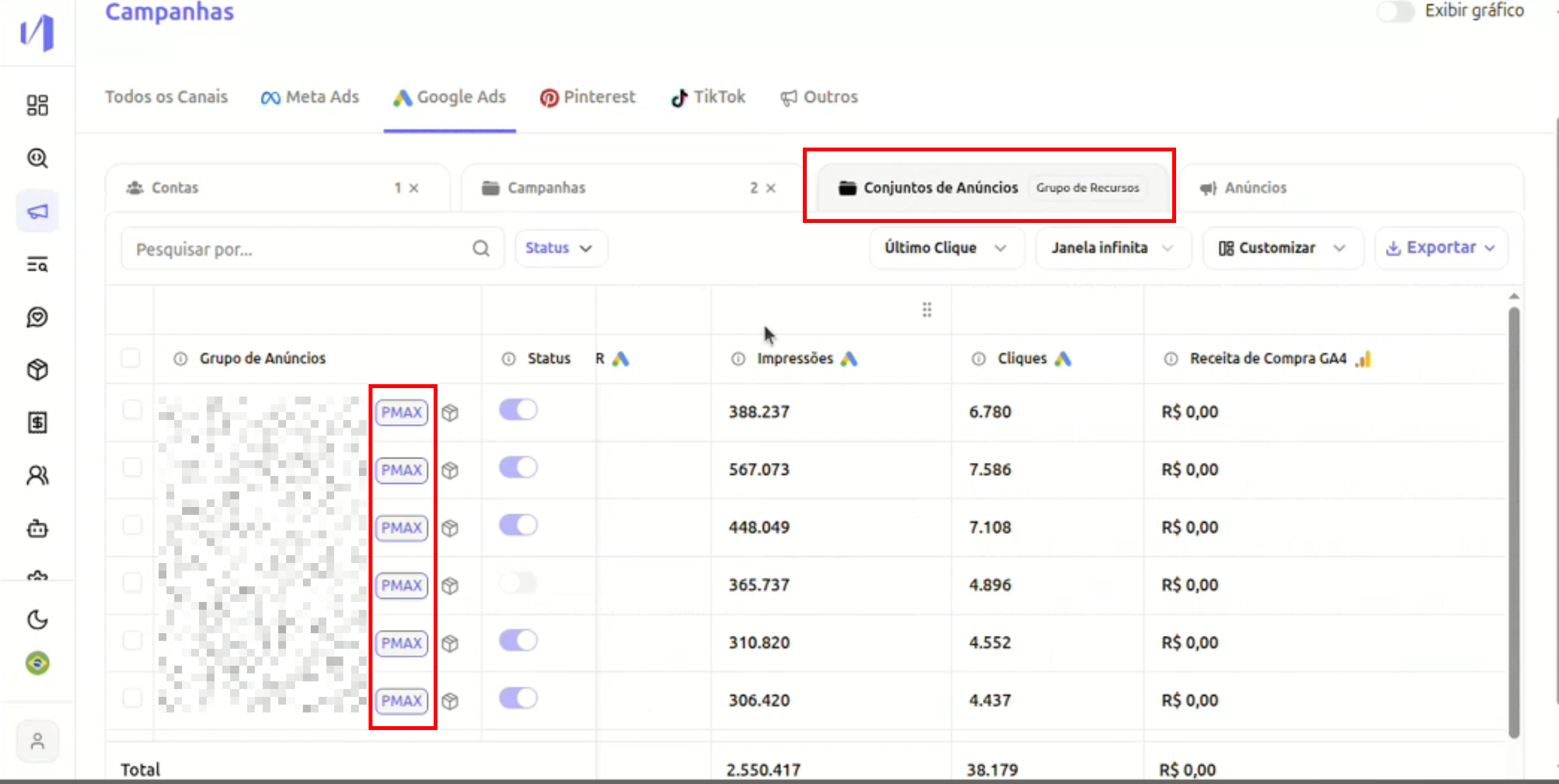
* View Resource Groups from PMAX campaigns
* Analyze metrics at the level:
* Campaign
* Resource Group (in case of PMAX)
## 2. **Where to find?**
Access: **Campaigns → Google Ads**
### In the "Campaigns" tab
PMAX campaigns appear with the **PMAX** tag next to the name.
You can normally view metrics such as:
* Impressions
* Clicks
* Revenue
* Profit
* ROAS
* Selected attribution model
 ### In the "Ad Sets" tab
If there is at least one PMAX campaign selected:
* The interface will indicate that there are Resource Groups
* Next to the title, it will show that this view includes Resource Groups
* Resource groups are displayed in the table
### In the "Ad Sets" tab
If there is at least one PMAX campaign selected:
* The interface will indicate that there are Resource Groups
* Next to the title, it will show that this view includes Resource Groups
* Resource groups are displayed in the table
 ## 3. **What are Resource Groups?**
In PMAX campaigns, Google does not use the traditional model of:
* **Campaign → Ad Set → Ads**
Instead, it organizes creatives and targeting within:
* **Campaign → Resource Group (Asset Group)**
Each resource group contains:
* Creatives
* Titles
* Descriptions
* Audiences
* Audience signals
Now you can analyze these groups directly in Nemu.
## 4. **How to use in practice?**
### Case 1: Compare performance between PMAX campaigns
1. Go to **Campaigns → Google Ads**
2. Filter or select PMAX campaigns
3. Compare metrics normally
### Case 2: Analyze performance within PMAX
1. Select a PMAX campaign
2. Go to the **Ad Sets** tab
3. View Resource Groups
4. Analyze:
* Impressions
* Clicks
* Revenue
* Performance by attribution model
This allows you to understand:
* Which group is generating the most revenue
* Which creative structure is performing better
* If there is concentration of results in only one group
## 5. **Important Notes**
* Non-PMAX campaigns continue to work normally.
* Resource group view only appears when there is a PMAX campaign in the selected context.
* There is no impact on attribution or metric calculation — just expanded visibility.
## **Next Steps:**
* Identify your PMAX campaigns by the tag next to the name.
* Compare performance between different PMAX campaigns.
* Analyze Resource Groups to understand the internal performance of each campaign.
* Use attribution models for deeper analyses.
If you have questions, [contact our support](mailto:contato@nemu.com.br).
## 3. **What are Resource Groups?**
In PMAX campaigns, Google does not use the traditional model of:
* **Campaign → Ad Set → Ads**
Instead, it organizes creatives and targeting within:
* **Campaign → Resource Group (Asset Group)**
Each resource group contains:
* Creatives
* Titles
* Descriptions
* Audiences
* Audience signals
Now you can analyze these groups directly in Nemu.
## 4. **How to use in practice?**
### Case 1: Compare performance between PMAX campaigns
1. Go to **Campaigns → Google Ads**
2. Filter or select PMAX campaigns
3. Compare metrics normally
### Case 2: Analyze performance within PMAX
1. Select a PMAX campaign
2. Go to the **Ad Sets** tab
3. View Resource Groups
4. Analyze:
* Impressions
* Clicks
* Revenue
* Performance by attribution model
This allows you to understand:
* Which group is generating the most revenue
* Which creative structure is performing better
* If there is concentration of results in only one group
## 5. **Important Notes**
* Non-PMAX campaigns continue to work normally.
* Resource group view only appears when there is a PMAX campaign in the selected context.
* There is no impact on attribution or metric calculation — just expanded visibility.
## **Next Steps:**
* Identify your PMAX campaigns by the tag next to the name.
* Compare performance between different PMAX campaigns.
* Analyze Resource Groups to understand the internal performance of each campaign.
* Use attribution models for deeper analyses.
If you have questions, [contact our support](mailto:contato@nemu.com.br).