> ## Documentation Index
> Fetch the complete documentation index at: https://docs.nemu.com.br/llms.txt
> Use this file to discover all available pages before exploring further.
# Products
> Manage your catalog, understand which products are sold together, and analyze which channels and campaigns sell each item most in Nemu's Products section.
The Products section allows you to manage your catalog, understand which products are sold together, and analyze which channels and campaigns sell each item the most. It is divided into three tabs: Manage, Insights, and Campaigns.
## 1. Manage Tab
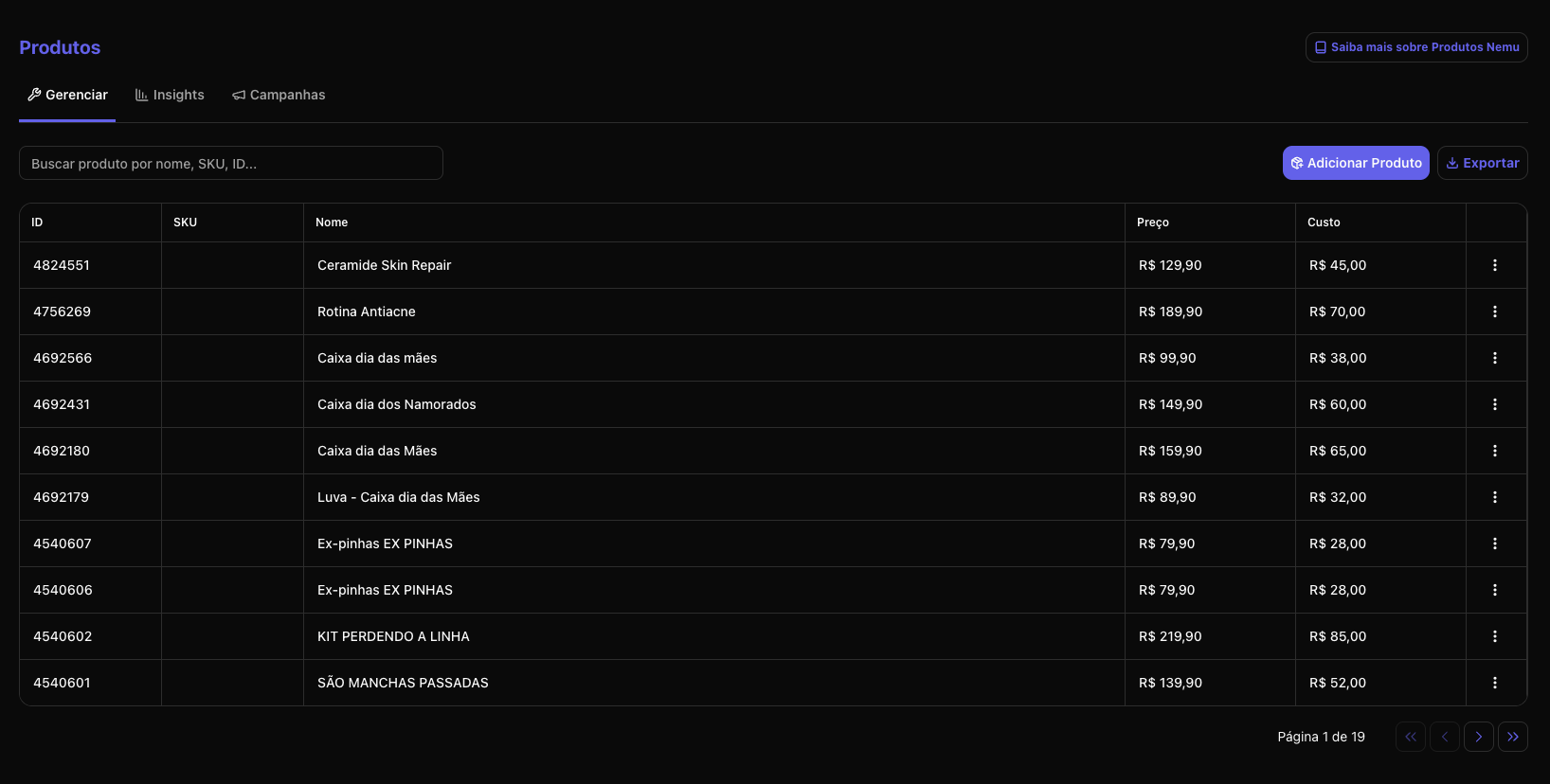
Here you view and organize all your products.
 ### What you find:
* Product ID
* SKU
* Name
* Sale Price
* Cost
* Actions menu **(⋯)**
### What you can do:
* Edit sale price and cost through the three-dot menu
* Add a new product manually
* Export the product list
#### Adding a new product
1. Click the **"Add Product"** button
### What you find:
* Product ID
* SKU
* Name
* Sale Price
* Cost
* Actions menu **(⋯)**
### What you can do:
* Edit sale price and cost through the three-dot menu
* Add a new product manually
* Export the product list
#### Adding a new product
1. Click the **"Add Product"** button
 2. Fill in the fields:
* **Name**: Product name *(required)*
* **ID SKU**: Unique product identifier
* **SKU**: Product stock code
* **Cost Price**: Product cost value
* **Sale Price**: Product sale value
2. Fill in the fields:
* **Name**: Product name *(required)*
* **ID SKU**: Unique product identifier
* **SKU**: Product stock code
* **Cost Price**: Product cost value
* **Sale Price**: Product sale value
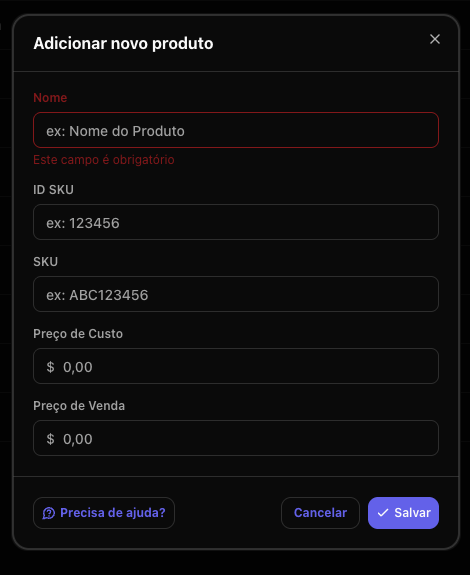 3. Click **Save** to finish
#### Editing an existing product
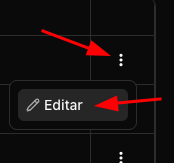
1. Click the three-dot menu **(⋯)** of the product you want to edit
2. Select **Edit**
3. Click **Save** to finish
#### Editing an existing product
1. Click the three-dot menu **(⋯)** of the product you want to edit
2. Select **Edit**
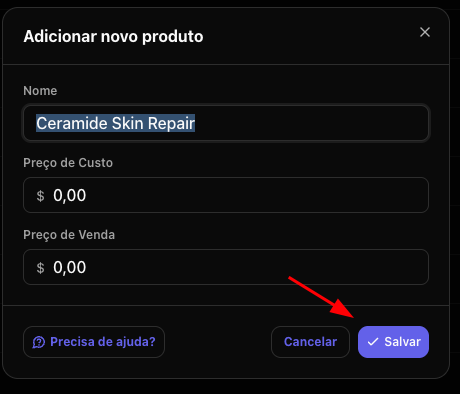
 3. Update the desired fields *(sale price, cost, etc.)*
4. Click **Save** to apply the changes
3. Update the desired fields *(sale price, cost, etc.)*
4. Click **Save** to apply the changes
 ### What is it for?
Keeping price and cost updated allows for more accurate analyses of:
* Margin per product
* Profitability
* Campaign performance considering profit, not just revenue
This tab works as your catalog manager within Nemu.
## 2. Insights Tab
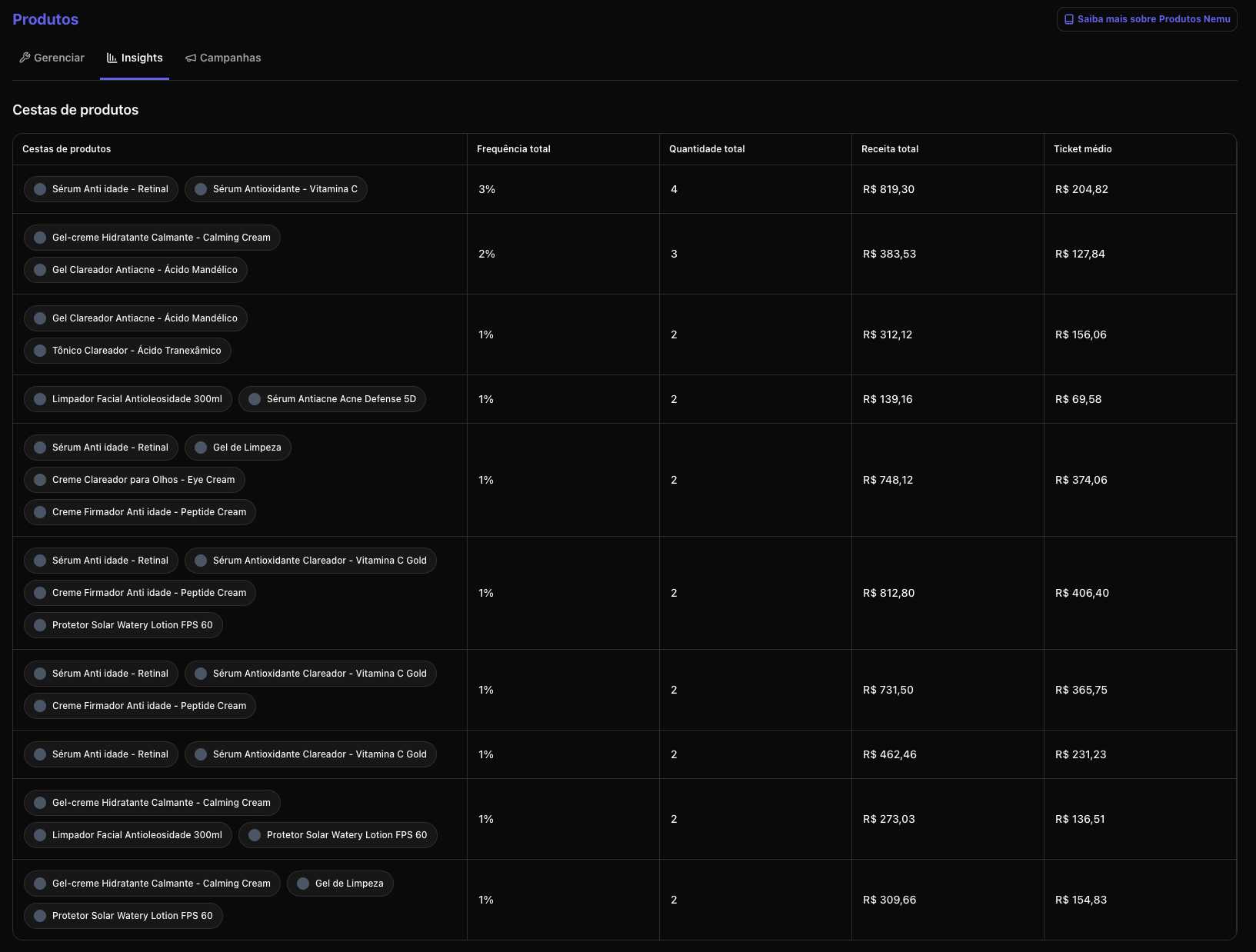
Here you understand your customers' purchasing behavior through product baskets.
### What are Product Baskets?
They are combinations of products purchased together in the same order.
**Example:**
* Product A + Product B
* Product A + Product C
### The table shows:
* Product combination
* Frequency (%)
* Total quantity sold
* Total revenue
* Average ticket
### What is it for?
Keeping price and cost updated allows for more accurate analyses of:
* Margin per product
* Profitability
* Campaign performance considering profit, not just revenue
This tab works as your catalog manager within Nemu.
## 2. Insights Tab
Here you understand your customers' purchasing behavior through product baskets.
### What are Product Baskets?
They are combinations of products purchased together in the same order.
**Example:**
* Product A + Product B
* Product A + Product C
### The table shows:
* Product combination
* Frequency (%)
* Total quantity sold
* Total revenue
* Average ticket
 ### What can you analyze?
✔ Which products have greater synergy\
✔ Ideas for creating kits\
✔ Cross-sell opportunities\
✔ Products that increase average ticket\
✔ Joint promotion strategies
**Practical analysis examples:**
* If two products appear frequently together → can become an official kit
* If a product greatly increases average ticket when combined → can be used as upsell
* If a product sells little alone but a lot in combination → it may depend on another to perform
This tab helps you make strategic decisions on:
* Pricing
* Bundles
* Business strategy
* Catalog organization
## 3. Campaigns Tab
Here you analyze the performance of a specific product by channel and campaign.
### How it works:
1. Search for the product in the search bar
2. Select the product
3. See which channels and campaigns sold that item
### The table presents:
* Source *(e.g., Google, Meta, TikTok, Direct)*
* Media
* Campaign
* Revenue
* Orders
* Quantity
* Participation %
* Average ticket
### What can you analyze?
✔ Which products have greater synergy\
✔ Ideas for creating kits\
✔ Cross-sell opportunities\
✔ Products that increase average ticket\
✔ Joint promotion strategies
**Practical analysis examples:**
* If two products appear frequently together → can become an official kit
* If a product greatly increases average ticket when combined → can be used as upsell
* If a product sells little alone but a lot in combination → it may depend on another to perform
This tab helps you make strategic decisions on:
* Pricing
* Bundles
* Business strategy
* Catalog organization
## 3. Campaigns Tab
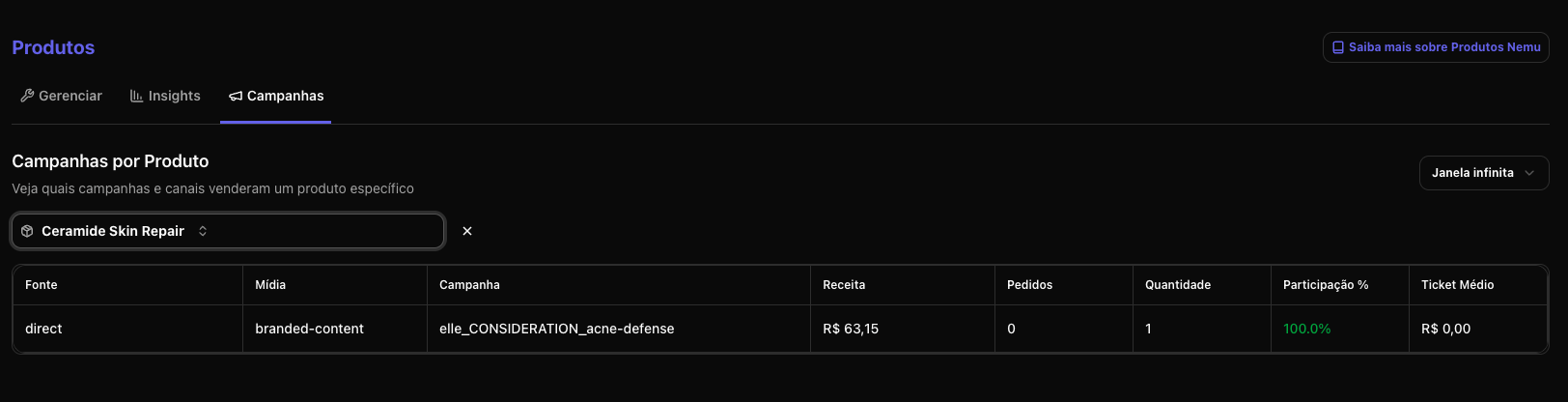
Here you analyze the performance of a specific product by channel and campaign.
### How it works:
1. Search for the product in the search bar
2. Select the product
3. See which channels and campaigns sold that item
### The table presents:
* Source *(e.g., Google, Meta, TikTok, Direct)*
* Media
* Campaign
* Revenue
* Orders
* Quantity
* Participation %
* Average ticket
 ### What you can analyze?
✔ Which channels sell a specific product the most\
✔ Which campaign generates the most revenue for that item\
✔ Difference in average ticket by channel\
✔ Participation of each channel in the product's total\
✔ Dependence on a single channel
**Strategic insight examples:**
* A product may perform better on TikTok than Google
* There may be high revenue volume in Direct → indicating brand strength
* Average ticket may vary depending on the channel
* A channel may generate a lot of quantity but little revenue (promotional price)
This allows:
* Adjust budget per product
* Create dedicated campaigns
* Optimize creatives for specific products
* Identify "hero" products by channel
## How to use the Products Section strategically
You can use the three tabs together:
* **Manage** → ensures correct price and cost data
* **Insights** → understands purchasing behavior
* **Campaigns** → understands acquisition performance
### Recommended analysis flow:
1. Identify a strategic product
2. See which campaigns sell that product the most
3. Analyze if it is sold alone or with others
4. Evaluate if it makes sense to create kits or dedicated campaigns
5. Adjust budget based on channel participation
### When to use each tab?
| Objective | Ideal Tab |
| --------------------------------- | --------- |
| Update price or cost | Manage |
| Create kits or promotions | Insights |
| Understand performance by channel | Campaigns |
| Adjust paid media by product | Campaigns |
| Identify cross-sell opportunities | Insights |
## Conclusion
The Products Section transforms your catalog into a strategic tool. You stop looking only at total revenue and start understanding:
* How each product performs
* How they relate to each other
* Which channels really drive each item
This allows for smarter decisions in marketing, pricing, and business strategy.
### What you can analyze?
✔ Which channels sell a specific product the most\
✔ Which campaign generates the most revenue for that item\
✔ Difference in average ticket by channel\
✔ Participation of each channel in the product's total\
✔ Dependence on a single channel
**Strategic insight examples:**
* A product may perform better on TikTok than Google
* There may be high revenue volume in Direct → indicating brand strength
* Average ticket may vary depending on the channel
* A channel may generate a lot of quantity but little revenue (promotional price)
This allows:
* Adjust budget per product
* Create dedicated campaigns
* Optimize creatives for specific products
* Identify "hero" products by channel
## How to use the Products Section strategically
You can use the three tabs together:
* **Manage** → ensures correct price and cost data
* **Insights** → understands purchasing behavior
* **Campaigns** → understands acquisition performance
### Recommended analysis flow:
1. Identify a strategic product
2. See which campaigns sell that product the most
3. Analyze if it is sold alone or with others
4. Evaluate if it makes sense to create kits or dedicated campaigns
5. Adjust budget based on channel participation
### When to use each tab?
| Objective | Ideal Tab |
| --------------------------------- | --------- |
| Update price or cost | Manage |
| Create kits or promotions | Insights |
| Understand performance by channel | Campaigns |
| Adjust paid media by product | Campaigns |
| Identify cross-sell opportunities | Insights |
## Conclusion
The Products Section transforms your catalog into a strategic tool. You stop looking only at total revenue and start understanding:
* How each product performs
* How they relate to each other
* Which channels really drive each item
This allows for smarter decisions in marketing, pricing, and business strategy.