

Configuring Meta Taxes
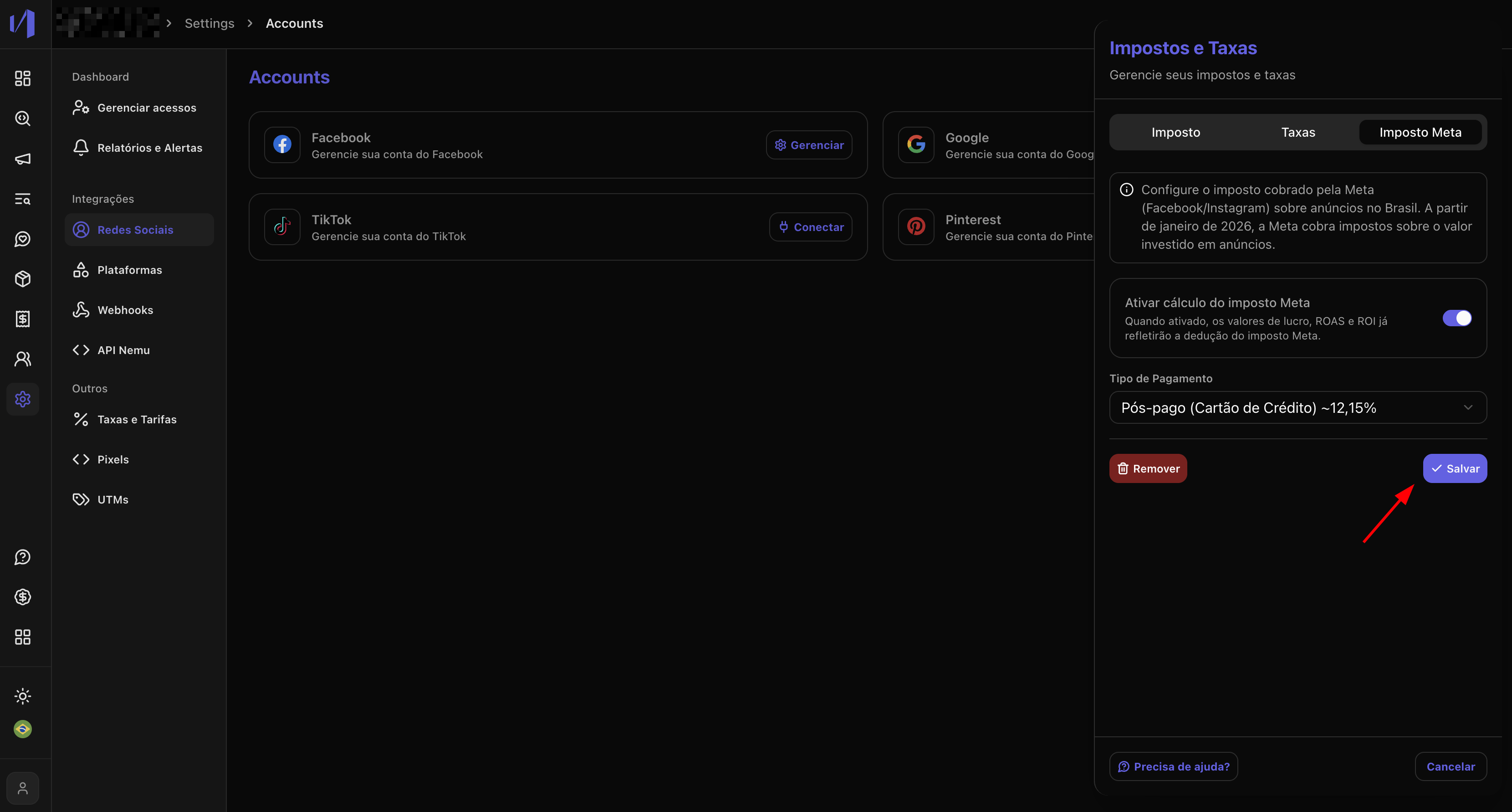
To configure Meta taxes, access the Taxes and Fees drawer in the platform settings. Steps to configure:- Navigate to Settings > Taxes and Fees
- Open the Meta Taxes tab
- Choose the payment type:
- Prepaid: 13.83% (recommended for prepaid accounts)
- Postpaid: 12.15% (recommended for postpaid accounts)
- Custom: Define a specific percentage
- Activate the configuration by clicking the toggle button
- Save the changes
2. Viewing Taxes in Campaigns
After configuring the taxes, you will see new columns related to Meta taxes in the Ad Manager tables, specifically in the Meta Ads tab.Available Columns
The following columns will be displayed in all tabs (Accounts, Campaigns, Ad Sets, and Ads):- Meta Tax: Tax amount calculated on the spend
- Profit w/ Meta Tax: Profit considering the tax
- ROAS w/ Meta Tax: Return on ad spend considering the tax
- ROI w/ Meta Tax: Return on investment considering the tax
- Margin w/ Meta Tax: Profit margin considering the tax
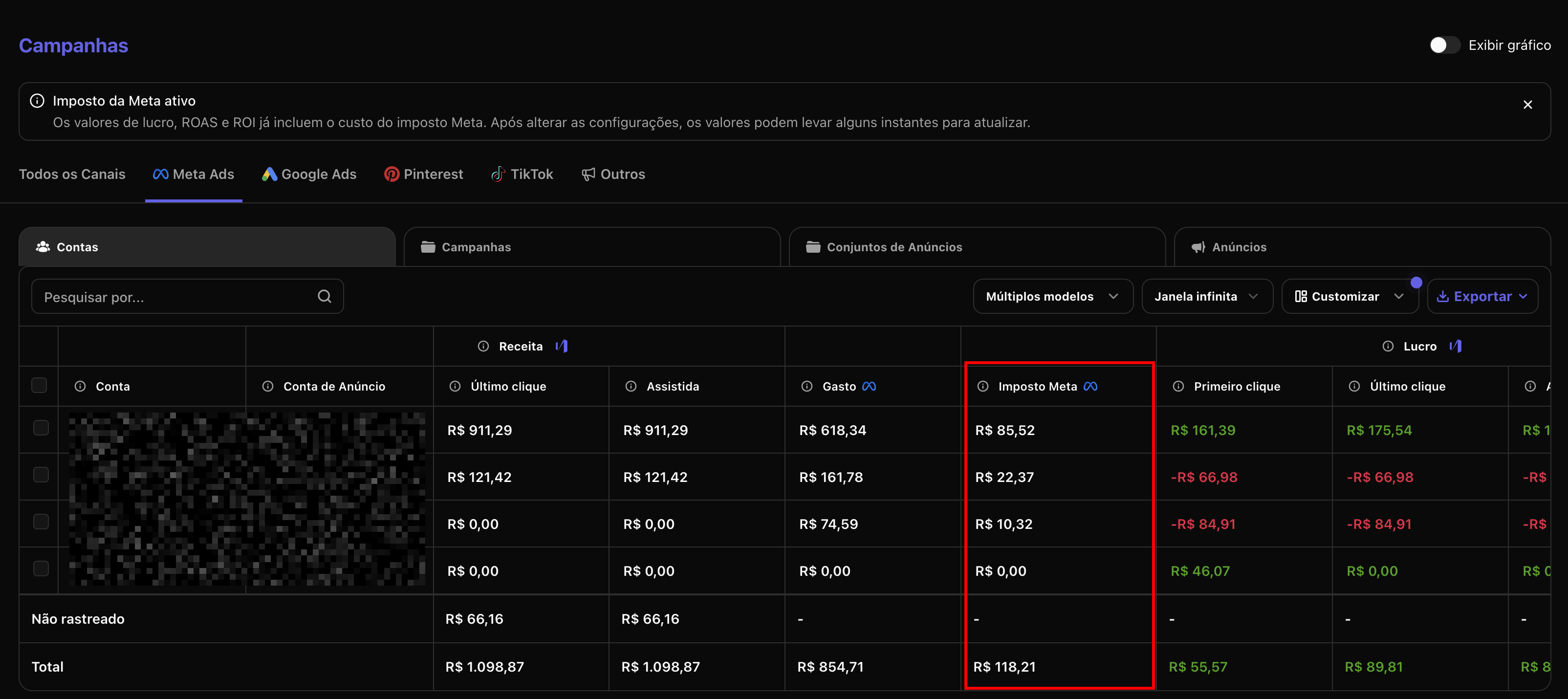
Tax columns only appear when the configuration is active and there are
recorded spends.
3. How Meta Taxes are Calculated
Meta taxes are calculated based on the total campaign spend and follow a specific formula that considers the configured rate.Calculation Formula
The tax amount is calculated using the following formula:- Spend: Total amount spent on the campaign/ad set/ad
- Rate: Configured percentage (e.g., 12.15% = 0.1215)
Practical Example
Suppose a campaign with spend of R$ 6,573.03 and rate of 12.15% (postpaid):- Declared spend: R$ 6,573.03
- Meta Tax (12.15%): R$ 909.08
- Total effective spend: R$ 7,482.11
Difference between Prepaid and Postpaid
- Prepaid (13.83%): Higher rate because the tax is already included in the amount you pay in advance
- Postpaid (12.15%): Standard rate for accounts that pay after ad execution
Impact on Metrics
All metrics related to profit and return (ROAS, ROI, margin) are recalculated considering the tax:- Profit w/ Meta Tax = Revenue - (Spend + Meta Tax) - Other Costs
- ROAS w/ Meta Tax = Revenue ÷ (Spend + Meta Tax)
- ROI w/ Meta Tax = [(Revenue - Spend - Meta Tax) ÷ (Spend + Meta Tax)] × 100
- Spend: R$ 6,573.03
- Meta Tax: R$ 909.08
- Revenue: R$ 151,875.00
Note that when considering the Meta tax, the ROAS decreases from 23.10x to 20.28x, and the profit reduces by R$ 909.08, reflecting the real cost of operations.
Tax Legislation
Meta taxes are applied in accordance with Brazilian legislation on digital services taxation. Meta (Facebook) is required to collect taxes on amounts paid by Brazilian advertisers, following the rules of the tax reform that came into effect. Main points of the legislation:- 12.15% taxation for postpaid accounts
- 13.83% taxation for prepaid accounts
- Application on the total value of ads served
- Direct collection by Meta to the Brazilian government