

What is Nemu MCP?
Nemu MCP is a connector that links your Nemu dashboard data directly to Claude. Once connected, you ask questions in natural language — “which campaign had the best ROAS last week?” — and Claude queries your actual operation data to answer. The connector uses MCP (Model Context Protocol), an open standard for giving AI assistants secure access to external data sources.Access is read-only. Claude can query and analyze your data, but cannot
change anything inside Nemu.
Requirements
- A claude.ai account with access to custom connectors.
- Access to the Nemu dashboard you want to connect (as the owner or with permission on it).
How to connect
1
Open the connector manager
On claude.ai, in a new chat, click the + button, go to Connectors and then Manage connectors.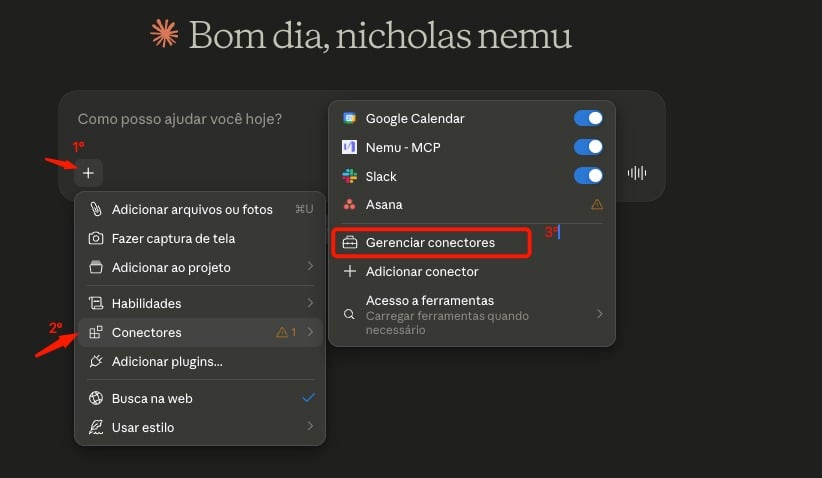
2
Add a custom connector
Click the + button and choose Add custom connector.
3
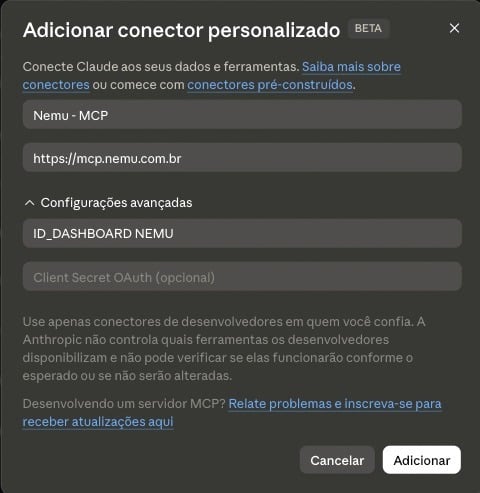
Fill in the connector details
- Name: a name to identify the connection, for example
Nemu - MCP. - URL:
https://mcp.nemu.com.br
- OAuth Client ID: your Nemu dashboard ID (see below how to find it).
-
OAuth Client Secret: leave it blank — it is not required.
4
Authorize the connection
Claude will redirect you to Nemu. Log in, review the dashboard being authorized and accept the connection.That’s it — the connector shows up in the list and is ready to use.
Where to find the dashboard ID
The dashboard ID is in your Nemu account URL, right after/dashboards/:
1234.
What you can ask
Once connected, Claude has access to the authorized dashboard’s data. Some examples of what you can ask for:Things to keep in mind
- One dashboard per connector. The connector only answers about the authorized dashboard. To query another dashboard, create a new connector with the matching ID.
- Query periods. Most queries cover up to 90 days at a time. Operational cost history reaches up to 365 days.
- Creative analysis can take longer. Questions involving creatives process images and transcribe video audio, so the answer takes more time than the others.